
There’s no single “best” Stripe accounting tool — the right choice depends on whether you already run a general ledger, what you sell, and where you operate. The market splits into four camps: Stripe’s own native reports, general ledgers like QuickBooks and Xero, sync connectors such as Synder, A2X and Bookkeep that feed those ledgers, and all-in-one platforms like Finotor that replace the stack entirely. Each one wins for a different kind of business.
This guide compares the real options side by side — what each actually does, who it suits, and where it falls short — so you can match a tool to your situation instead of to a feature list.
In Brief
- There’s no universal “best” — it depends on whether you already use a ledger, what you sell, and which regions you operate in.
- Stripe’s native reports are free and accurate at the source, but manual, and they don’t do your bookkeeping.
- QuickBooks / Xero are mature ledgers, but Stripe payout reconciliation is weak without an add-on.
- Connectors (Synder, A2X, Bookkeep) sync Stripe data into those ledgers — powerful, but they need a separate ledger subscription on top.
- All-in-one platforms (Finotor) replace the ledger-plus-connector stack with one tool — suited to EU/international sellers who want native VAT/OSS and AI automation.
Top Stripe Reconciliation Tools to Streamline Your Business Finances
Why You Need the Best Tools for Stripe Reconciliation
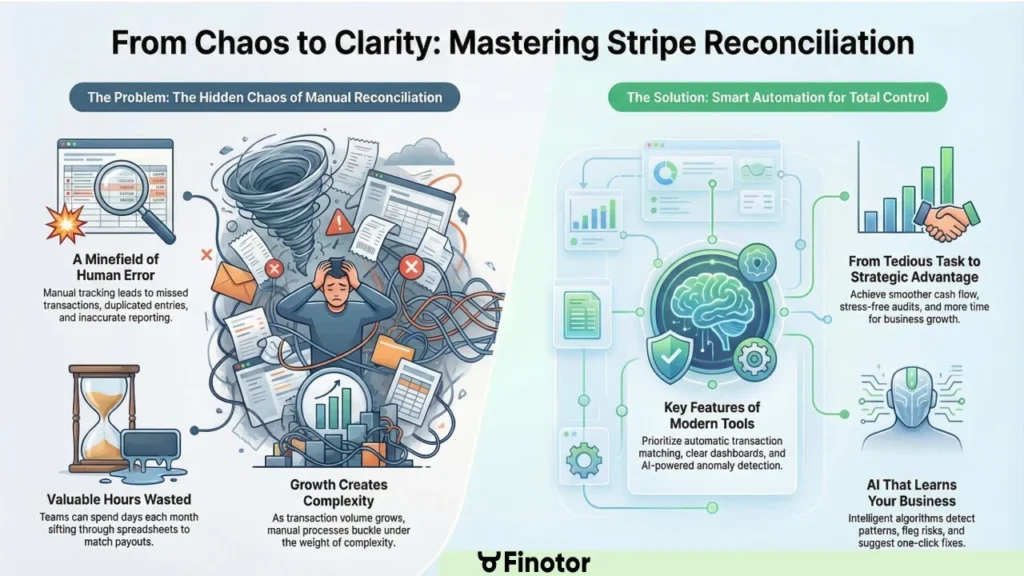
Stripe is the backbone of countless modern businesses—fueling everything from indie eCommerce shops to global SaaS empires. Yet, the hidden chaos beneath its glossy interface is reconciliation: matching every payment, fee, refund, and payout to your books. Manual tracking isn’t just slow; it’s a minefield of missed transactions, duplicated entries, and late reporting.
The right reconciliation tool hands you clarity, confidence, and speed. Instead of sifting through rows of CSVs and reconciling payouts in spreadsheets, automation does the heavy lifting for you. As your operation grows, being proactive with reconciliations means more accurate insights, faster decision-making, and simplified year-end closing.
If you’re relying only on generic tools like the Wave app, you’re likely leaving value on the table. Modern reconciliation platforms bridge gaps left by older solutions, automatically linking Stripe data with your accounting systems and surfacing actionable insights. The most important thing is: don’t let Stripe become a financial blind spot in your business.
Features to Look for in Stripe Reconciliation Software
How do you decide which of the many reconciliation tools fits your business? Don’t just focus on the basics—look for platforms that offer workflows tailored to digital commerce companies.
- Automatic transaction matching: Matching every Stripe payment and refund with your accounting records is non-negotiable.
- Bulk upload and automated Stripe data collection: Manual imports don’t scale. Look for tools that pull data directly from Stripe APIs or provide one-click imports.
- Clear, customizable dashboards: Visual summaries help you spot issues and trends in seconds—no accountant required.
- Integration with eCommerce, SaaS, and other finance platforms: Ensure your tool fits your actual workflow, not the other way around.
- Task automation with AI or smart rules: Advanced tools can flag anomalies, suggest fixes, and learn your preferences for next time.
Ultimately, you want a product that grows with your business, serving everyday eCommerce needs and complex SaaS models alike.
How we compare — and who makes this guide
Finotor publishes this guide, so weigh our recommendation with that in mind. We’ve tried to earn your trust by being fair: every tool below is judged on the same criteria — direct Stripe connection, payout reconciliation, fee and refund handling, reporting, multi-currency and VAT, and how much manual work is left to you — and we say plainly where a competitor is a better fit than Finotor. If you already run QuickBooks or Xero with an accountant, or you sell physical goods across marketplaces, you’ll see us point you elsewhere.
Where Finotor Fits — and Where It Doesn’t
Finotor is an all-in-one financial platform: it reconciles Stripe payouts, keeps your books, produces reports and runs AI categorization — without a separate QuickBooks or Xero subscription underneath. That’s the core difference from the connectors above, which sync Stripe data into a ledger you still pay for and maintain.
Finotor is likely the right call if you:
- want a single tool for bookkeeping, reconciliation and reporting, rather than a ledger-plus-connector stack;
- sell across the EU or internationally and need native VAT / OSS handling, not a US-tax-first tool;
- collect through Stripe (and WooCommerce, Shopify or PayPal) and want it reconciled to your bank automatically;
- want AI to categorize transactions and flag anomalies, and prefer an affordable self-serve plan over a done-for-you service.
Finotor is probably not the right call if you:
- already run QuickBooks or Xero with an accountant who’s happy there — a connector like Synder or Bookkeep slots into that setup with less disruption;
- need deep inventory and COGS accounting for physical goods across Amazon and Shopify — a specialist like A2X is purpose-built for that;
- only need occasional, at-source checks and have the time to export Stripe’s own reports yourself.
If the first list sounds like your business, see how Finotor connects to Stripe and try it free. If the second sounds more like you, one of the tools above will serve you better — and we’d rather tell you that now.
Finotor: An AI-Powered Ally for Accurate Stripe Reconciliation
Finotor is redefining the landscape for Stripe users. From its intuitive UI to its deep AI-powered analytics, this platform fits both the founder manually importing CSVs and the scale-up drowning in high-volume payouts. The AI backbone analyzes discrepancies, learns your reconciliation patterns, and deploys automations that would take a human team hours.
With the Stripe Accounting Guide, even reconciliation rookies feel like finance pros in under an hour. Bulk upload features handle months of historic data in minutes, and customizable automation means you’ll spend more time growing your company and less time “doing the books.”
As data security and compliance become top-of-mind in 2025, platforms like Finotor usher in peace of mind with end-to-end encryption and robust error-checking. Entrepreneurs can finally trust their numbers without second-guessing every payout.
⚡ How Finotor Simplifies Stripe Transaction Matching for Entrepreneurs
Imagine you’re Charlotte, founder of an eCommerce boutique. Every week, Stripe payouts land in your bank—but matching them to individual orders can be a nightmare. That’s where connecting Stripe to Finotor changes everything. The platform pulls in your live Stripe data and aligns it automatically to each transaction. If there’s a mismatch—a refund, double payment, or chargeback—Finotor flags it instantly.
Even better, Finotor’s dashboard color-codes anomalies, highlights unresolved transactions, and gives you a single-click fix option. Forget about late nights with spreadsheets. Instead, your cash flow becomes clear, organized, and audit-ready. Entrepreneurs like Charlotte now spend minutes (not hours) on month-end close, and can confidently present clean data to lenders or investors.
Real-Life Example: Startup Success with Finotor’s Reconciliation Dashboard
Take Alex, who runs a fast-growing SaaS startup. Before using Finotor, his team spent two days a month reconciling Stripe statements—juggling charges, subscriptions, and refunds across multiple currencies. Once they linked their Stripe connect to Finotor, the dashboard flagged mismatches, grouped multi-currency payouts, and auto-matched all historical data within the first week.
The result? Freed-up finance hours, reduced human errors, and a real-time, bird’s-eye view of revenues. Alex’s investor pitch now includes a visual dashboard of live metrics—delighting stakeholders and paving the way for faster funding rounds.
Step-by-Step Guide: Automating Stripe Data Uploads in Finotor
Curious about how simple automation can be? Here’s the workflow:
- Register for Finotor and access the eCommerce dashboard.
- Use the ‘Stripe connect to Finotor’ feature—link your account securely in seconds.
- Import your historic and current Stripe data with one click or set up real-time sync.
- The AI engine begins auto-matching transactions, highlighting discrepancies for review.
- Resolve, customize, or automate rules for recurring mismatches as needed.
You can also check out this video walk-through on Stripe automation to see the process in action. Smooth, automated workflows make year-end closing headache-free.
Comparing Finotor with Other Popular Stripe Reconciliation Tools
Today’s market brims with solutions promising to “automate Stripe reconciliation”—but the devil’s in the details. Here’s how Finotor stacks up against some familiar names:
| Feature | Finotor | Zapier | QuickBooks Online | Wave app |
|---|---|---|---|---|
| Stripe direct connect | Yes | No | Yes (limited) | No |
| Automated transaction matching | AI-driven | Basic rules | Manual or semi-auto | Manual |
| eCommerce focus | Full | No | Partial | No |
| Customizable reports | Yes | Minimal | Yes | Yes |
| AI anomaly detection | Yes | No | No | No |
Zapier vs Finotor: Automation and Customization Features
Zapier excels at simple automation between apps, like moving data from Stripe to email or spreadsheets. But when it comes to specialized tasks like auto-matching Stripe payouts or flagging duplicate entries, it falls short. Finotor lets users set up robust, finance-specific automations and customize workflows for recurring Stripe reconciliation needs.
For example, if your eCommerce shop relies on daily Stripe payouts, Finotor’s smart engine grabs your data, matches all payments to sales, and even suggests fixes for unresolved entries. With Zapier, you’d still be stuck reviewing each row manually.
QuickBooks Online Integration: Which Tool Fits Your Business?
QuickBooks is a financial staple for many businesses and does offer some Stripe integration. Finotor, however, brings deeper Stripe-savvy features: dedicated dashboards, smart anomaly resolution, and peace-of-mind through AI-powered checks.
If you want to take QuickBooks to the next level, Finotor can seamlessly export your reconciled data into your books. This dual-system approach is popular with startups and scale-ups looking for “set it and forget it” automation with advanced oversight.
| Use Case | Finotor | QuickBooks Online |
|---|---|---|
| Automate Stripe payout reconciliation | Built-in | Add-on/manual |
| AI-powered suggestions | Included | Not available |
| Depth of Stripe analytics | Advanced | Basic |
| Export to accounting | Easy export | Native |
How Effective Stripe Reconciliation Boosts Your Cash Flow Management
Accurate, instant Stripe reconciliation isn’t just about compliance. It gives you live visibility into what’s really happening with your cash. Every payment, refund, and fee lands in your dashboard—with no surprises lurking beneath your Stripe payout reports.
Better cashflow management starts with real-time alerts of discrepancies, same-day resolution of mismatches, and forecasting tools that show you what’s coming next. When your Stripe accounting is this proactive, you can invest, pay suppliers, and grow your business with full confidence in the numbers.
A must-do for every modern business: use the Stripe payout reconciliation template to benchmark your current process, then see where improved automation can save time and headache.
Getting Started: The Right Software for Stripe Beginners and Solopreneurs
The Priority: Simplicity and Direct Integration
For a freelancer or a tiny shop, the goal isn’t fancy features; it’s pure simplicity. You just want to connect Stripe and have it “work” with zero headaches. Spending hours on setup? No thanks. You need automation now. 📉
The software must offer a native integration or a trusted partner app. We are looking for a ““plug-and-play” solution that handles basic transaction synchronization automatically. If you have to manually import CSV files, you’re doing it wrong.
Popular Choices and Their Limits
You’ll often hear names like QuickBooks or Xero thrown around as the default starting point. They are the big giants everyone knows, and yes, they do integrate with Stripe.
At first, their standard integrations might seem enough for your needs. They successfully import your sales data and create entries. It looks fine on the surface, but don’t be fooled. 🧐
Here is the trap: these standard integrations often fail miserably with payout reconciliation. They create messy duplicates or fail to separate fees, leaving your books a total disaster. You risk losing track of cash.
When You’ll Know It’s Time to Upgrade
What’s the red flag? It’s when you waste more than an hour every month fixing Stripe entries or hunting down a mysterious discrepancy. If you are fighting your software, you are losing money. 💸
If the words “Stripe balance” and “bank deposit” give you cold sweats because they never match, your simple system has hit its limit. You need a real solution like Finotor to stop the bleeding.

Scaling Up: Accounting Tools for Growing E-commerce and SaaS Businesses
Your business is finally taking off 🚀. But let’s be honest, those starter tools you used on day one are starting to smoke under the pressure. It is time to shift gears.
New Challenges: Inventory, Subscriptions, and Multi-Currency
Growth brings a whole new set of headaches. It is not just that your transaction volume is exploding; the real trouble lies in the complexity that spreadsheets can no longer handle.
- Inventory Management: For e-commerce, sales from Stripe must sync with inventory levels to prevent selling stock you don’t actually have.
- Subscription Metrics (SaaS): You need to track MRR, churn, and LTV, which requires more than just raw transaction data.
- Sales Tax/VAT: Selling across states or countries means complex tax calculations that your software must handle automatically.
- International Payments: Handling multiple currencies becomes a regular occurrence, not an exception, requiring precise FX tracking.
Feature Comparison: What to Look For
At this stage, a simple integration just won’t cut it anymore. You need a platform that centralizes these chaotic flows and automates the heavy lifting for you.
| Feature | Basic Software (e.g., QuickBooks basic sync) | Growth-Oriented Software (e.g., NetSuite, Finotor) |
|---|---|---|
| Payout Reconciliation | Manual/Basic | Fully automated & line-item matching |
| Fee Handling | Grouped as expense | Tracked per transaction |
| Multi-Currency | Basic conversion | Real-time FX rates & reporting |
| Tax Calculation | Manual / add-on | Built-in automated tax engine |
| Subscription Analytics | Not available | Integrated MRR / churn tracking |
| Scalability | Limited by transaction volume | Handles high volume of transactions |
The Role of Specialized Connectors and Platforms
Sometimes, the solution isn’t just a single piece of software, but a smart combination. You might need a robust ERP or accounting tool coupled with a specialized connector designed specifically for Stripe.
These connectors act as expert translators between Stripe and your accounting system, guaranteeing perfect data fidelity. They stop you from losing money on hidden fees or currency conversion errors.
Platforms like Finotor are designed to be this exact all-in-one solution, acting as both your financial software and the intelligent connector you desperately need.
Playing in the Big Leagues: Advanced Compliance and Multi-Entity Accounting
You are no longer managing a simple shop, but an empire. The rules of the game change here. Your tools must now match the high stakes of compliance and complex structures.
When Accrual Accounting Gets Serious: ASC 606 and IFRS 15
For companies reaching a certain size, specifically SaaS or those seeking investors, revenue recognition becomes a strict legal obligation. You cannot simply book cash when it hits the bank account. That method fails as you scale. Accuracy is mandatory.
Standards like ASC 606 and IFRS 15 dictate precisely how and when you count revenue. You must match earnings to the actual delivery of service. This applies to long-term contracts and subscriptions.
A simple spreadsheet is no longer enough. You need a system that automates these complex calculations to remain compliant. Manual entry becomes a liability you cannot afford.
Stripe’s Native Tools: Revenue Recognition, Sigma, and Tax
Stripe understood this need and built its own tools. These are not full accounting software suites. Instead, they are powerful modules designed to handle specific financial headaches.
Stripe Revenue Recognition automates the heavy lifting for ASC 606 compliance. Stripe Tax calculates sales tax globally without manual input. Stripe Sigma gives you direct SQL access to your raw data for custom reporting. These tools provide granular control.
For a complex business, relying solely on a third-party app for revenue compliance is a risk. Stripe’s native tools offer unparalleled data accuracy because they live at the source.
These tools integrate seamlessly with ERPs like NetSuite for a complete picture. You get the best of both worlds. This connection ensures your financial data remains synchronized.
Managing Multiple Entities and Consolidation
If your business has multiple subsidiaries, each with its own Stripe account, the complexity increases immediately. You cannot log in and out all day. You need a centralized view to keep your sanity intact. Efficiency demands a unified dashboard.
The ideal software allows navigation between entities from a single dashboard. It must generate consolidated reports instantly. This capability is non-negotiable for understanding your global cash flow. You simply cannot fly blind with scattered data across different regions.
Solutions like Finotor are specifically designed for multi-entity management. They centralize your data while maintaining distinct accounting for each subsidiary. It acts as a robust financial management solution for small businesses that are scaling up operations. This approach secures your growth.
AI and Machine Learning in Stripe Reconciliation: The Finotor Advantage
Artificial intelligence is shaking up finance, and nowhere is this clearer than in reconciliation. Unlike human teams—prone to fatigue and bias—Finotor’s algorithms scan thousands of transactions in seconds, detect nuanced transaction anomalies, and suggest one-click fixes.
If your business faces chargebacks or refunds, the AI identifies patterns early, flagging risks before they turn into revenue leaks. Best of all, the more you use it, the smarter it gets: your Stripe to Finotor sync becomes a superpowered assistant. This intelligent automation goes far beyond static rulesets, adapting to your company’s unique financial DNA.
For a deep dive into automating payout flows, pause and explore the Reconcile Stripe payouts automatically walkthrough.
Best Practices for Managing Your Stripe Transactions Like a Pro
Regular, scheduled reconciliation sessions beat last-minute panic every time. Whether you’re a solo entrepreneur or a team of 10, set a weekly reminder to review your dashboard. Use visual tagging to flag suspicious payouts, and automate as much as possible.
Always backup your Stripe data and export key reports monthly. Modern tools make this painless: with one click, you can archive snapshots for compliance or audits. Remember, good hygiene now avoids empire-building headaches later.
If you’re new to the process, the fully-automated Stripe reconciliation guide offers end-to-end instructions for bulletproof bookkeeping.
Scaling Your Business? Why Upgrading Stripe Reconciliation Tools Matters
Growth brings complexity. Yesterday’s spreadsheet only works when you have a trickle of orders. As soon as you scale, old processes buckle under the weight of volume, multiple currencies, and cross-border payouts. Upgrading your Stripe reconciliation platform is essential for staying ahead.
Savvy founders don’t just upgrade when overwhelmed—they do it proactively to ensure robust oversight, transparency, and clean books for fundraising rounds. Modern tools adapt to scale, handling everything from your first 100 transactions up to thousands every hour.
A great resource for scaling companies: try the eCommerce automation guide and see how process improvements translate into new growth opportunities.
Tips for Entrepreneurs: Getting the Most Out of Your Stripe Reconciliation Software
Don’t settle for the default setup—personalize your dashboard, automate routine reviews, and set custom alerts. Stay engaged with your finances by checking out new Finotor features or joining user communities to swap tips.
If you’re managing a coaching business or SaaS startup, tailor your workflows using specialized views. See how the automation guide for coaches can give service entrepreneurs a strategic advantage.
Curiosity pays off—test new process templates, like those for multi-currency payouts or subscription revenue. Gradually, you’ll refine a set of best practices that’s unique to your business and practically error-proof.
FAQ
Why Finotor Is the Go-To Platform for Small Business Owners Using Stripe
Small businesses thrive on speed, agility, and focus. Finotor streamlines even the messiest Stripe accounts, reducing time spent on reconciliation from hours to minutes. The platform is built for founders: no jargon, just instant clarity and actionable insights.
Whether you specialize in SaaS, eCommerce, or coaching, choosing a tool designed for your real-world use case is vital. Finotor delivers with the ease of the best Stripe accounting automation and rock-solid reliability, making it the chosen ally for digital entrepreneurs in 2025.
What exactly is Stripe reconciliation and why is it important?
Stripe reconciliation means matching payments, refunds, and fees in your Stripe account with your bank and accounting records. It prevents errors, catches fraud, and ensures your financial data is always accurate for audits or funding.
How can I automate my Stripe reconciliation process?
You can automate by connecting your Stripe account to platforms like Finotor, letting them auto-match transactions and flag issues. Explore tools like Finotor’s AI and use easy guides such as the fully-automated reconciliation walkthrough to get started quickly.
What should I look for in Stripe reconciliation tools?
Prioritize automatic transaction matching, live dashboard views, eCommerce integrations, and customizable reports. Features like anomaly detection and AI suggestions add extra care and accuracy.
Is Finotor only for tech startups or can any small business use it?
Finotor works for a wide range of business types—eCommerce shops, SaaS companies, consulting agencies, and even coaches. Its templates and automations are customizable for varied sectors.
Are there free templates or trial resources for reconciling Stripe payouts?
Absolutely—Finotor offers a free Stripe payout reconciliation template as a starting point. You can access demos, tutorials, and videos showing exactly how to automate your workflow at no risk.
TO KNOW MORE ABOUT STRIPE AND FINOTOR…
1. Reconcile Stripe payouts automatically
Stop manual reconciliation. Automate Stripe payouts with Finotor. How to automate Stripe payouts reconcile today: → Reconcile Stripe payouts automatically
2. Stripe Payouts Structure
Learn how Stripe calculates your payout and how Finotor tracks it: Pro guide to get paid: → Stripe payout structure
3. Stripe Accounting Guide
Everything you need to manage accounting with Stripe—automated. Automate & Reconcile to master your payouts: → Stripe Accounting Guide
4. Best Accounting Software for Stripe
Compare solutions for Stripe users and discover full automation. The bottom line: manual reconciliation of Stripe payouts creates a financial mess. Real success comes from automating the complex matching of batched deposits to specific sales and fees: → Best Accounting Software for Stripe
5. Accounting for SaaS using Stripe
Automate MRR, churn, invoices and payout accounting. Is the complexity of stripe accounting saas and deferred revenue turning your monthly close into a total nightmare? We explain how to tame this beast and align your financial reporting with the reality of your business: → Accounting for SaaS using Stripe
6. Stripe Reconciliation Automated
Stop reconciling Stripe manually and automate it with Finotor. Does the nightmare of manual stripe reconciliation leave you feeling overwhelmed by mismatched numbers and hidden fees every single month? Full Automated Guide: → Stripe reconciliation automated
7. Stripe Reconciliation Template
Download a Stripe reconciliation template or automate it entirely. The bottom line: Stripe provides raw data exports, not a ready-made reconciliation template. Free Download: → Stripe reconciliation template
8. Stripe Reconciliation Template
Automate accounting for coaches using Stripe. Are you sick of wasting hours manually reconciling payments instead of coaching your clients, even though you use stripe for coaches? : → Stripe for coaches
9. Best Reconciliation tools for Stripe
Best tools for Stripe reconciliation. Managing Stripe reconciliation doesn’t have to be a complex chore reserved for accountants. The digital age brings a host of innovative solutions letting founders and finance pros automate, analyze, and streamline every step involved in reconciling their eCommerce transactions: → Best reconciliation tools