
The bottom line: Manual Stripe accounting is a dangerous trap because net payouts rarely match gross sales data. Real financial health requires automating this reconciliation process to instantly generate accurate, balanced journal entries. This strategic shift saves hours of work and finally provides a clear, real-time view of your actual profits. 🤯 Don’t stay in the dark: Reconcile Stripe payouts automatically.
Are you still drowning in spreadsheets trying to make sense of your stripe ecommerce accounting while your bank deposits never seem to match your actual sales figures? 🤯 This guide breaks down exactly how to stop the manual guesswork and implement a fully automated workflow that handles fees, refunds, and taxes without you lifting a finger. Get ready to reclaim your valuable time and finally see your true profit margins with a smart setup that works as hard as you do. 🚀
- Why Your Ecommerce Accounting Is a Mess (and How Stripe Starts to Fix It)
- Beyond Payments: Stripe’s Built-in Accounting Automation Tools
- The Heart of the Matter: Automating Stripe Payout Reconciliation
- Does Stripe Replace Your Accountant? (The Real Answer)
- Supercharge Your Setup: How Tools Like Finotor Complete the Picture
- Real-World Examples: From Chaos to Clarity
- Getting Started: Your Practical Checklist for Stripe Accounting Automation
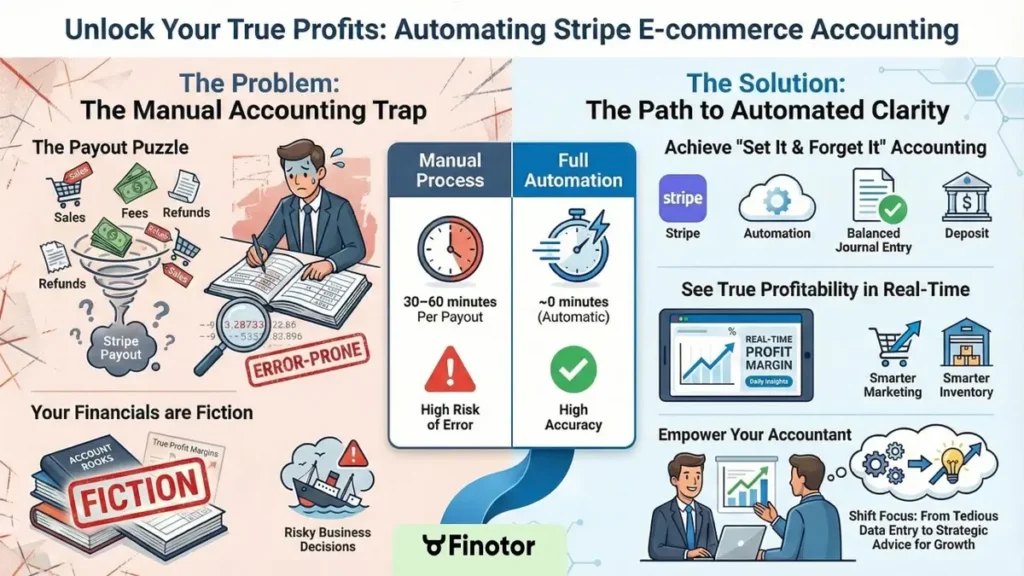
Infographic: Stripe Accounting for Ecommerce
Why Your Ecommerce Accounting Is a Mess (and How Stripe Starts to Fix It)
The Spreadsheet Nightmare You Know Too Well
You are drowning in endless CSV files and mismatched sales data from Shopify or WooCommerce. It is a chaotic mess that makes you want to scream. Trying to track every single fee feels like a losing battle. 🤯
How many hours do you waste every single month just trying to figure out what money actually landed in your bank account? It is a massive drain on your energy.
This is not just annoying; it is dangerous for your business. Bad data leads to terrible decisions, cash flow shocks, and zero clue about your true profitability. That is a scary place to be. 😫
What Are Stripe Payouts and Why Are They Confusing?
A Stripe payout is not your total sales figure. It is the net amount deposited into your bank account after Stripe grabs its cut for fees, refunds, and chargebacks. That difference is exactly where the confusion starts.
Payouts lump transactions from different days together, creating a total mess. Matching one bank deposit to hundreds of individual orders becomes a massive puzzle you have to solve.
We call solving this puzzle payout reconciliation. If you get this wrong, your financial reports are basically fiction, and your stripe ecommerce accounting fails. You need automation to fix this headache.
For many ecommerce owners, the bank deposit from Stripe feels like a mystery number. It’s the right amount, but connecting it back to individual sales is where the accounting nightmare begins.
Stripe’s First-Level Fix: The Basic Reports
Stripe knows this is a major pain point for you. They offer built-in tools like the Payouts report and Balance report to help you start making sense of things.
These reports break down a payout into gross charges, fees, and refunds. It is a big step up from nothing, sure. But you still have to manually punch that raw data into your accounting software.
Here is the catch: seeing the data does not mean the accounting is done. It is like having a recipe but still needing to cook the meal yourself. Tools like Finotor can handle the heavy lifting.
Beyond Payments: Stripe’s Built-in Accounting Automation Tools
So, basic reports are a good start, but the real magic happens when you stop just looking at data and start automating it. Stripe has evolved far beyond a simple payment gateway.
Stripe Billing for Automated Invoicing and Subscriptions
Stripe Billing isn’t just a feature; it is the engine for businesses running on recurring revenue, like subscription boxes or SaaS platforms. It handles the heavy lifting by creating and sending invoices automatically, managing recurring payments without you lifting a finger.
Here is the kicker for your books: every automated invoice acts as a pristine, pre-categorized transaction record. This wipes out the need for manual data entry regarding recurring sales, which is a massive time sink.
Picture a meal-kit startup using Stripe to bill 1,000 subscribers weekly. The accounting for that revenue is automatically generated, saving hours of grunt work that you could track better with tools like Finotor.
Stripe Tax for Handling Sales Tax Compliance
Stripe Tax is basically a lifesaver for any ecommerce merchant. Let’s face it, sales tax is a massive headache, with shifting rates across every state and country that can trip you up. 🤯
It works by automatically calculating and collecting the precise sales tax amount on every single transaction based on your customer’s location. You stop guessing and start complying immediately.
From an accounting perspective, Stripe hands you reports showing exactly what was collected, making tax returns far simpler. It creates a clear audit trail that keeps the tax man happy.
Stripe Revenue Recognition: The Accountant’s Friend
This is one of Stripe’s most powerful, yet criminally underused, features for serious businesses. Accounting standards like ASC 606 have strict rules about when you can actually “recognize” revenue, and ignoring them is risky.
Here is the deal: if a customer pays $120 for an annual subscription in January, you can’t book all $120 right then. You have to recognize $10 each month to reflect reality.
Stripe Revenue Recognition automates this entire complex process. It generates the correct journal entries, ensuring your books are compliant without you needing a degree in accounting. This is true financial automation that streamlines your stripe ecommerce accounting.
- Stripe Billing: Automates recurring invoices and payments.
- Stripe Tax: Automatically calculates and collects sales tax worldwide.
- Stripe Revenue Recognition: Automates complex revenue accounting to keep your books compliant.
The Heart of the Matter: Automating Stripe Payout Reconciliation
Okay, so Stripe’s tools can automate billing and complex accounting rules. But what about that core problem we talked about—matching the cash in your bank to the sales you made?
Manual Reconciliation: The Slow and Risky Way
You grab a coffee, download the generic Payout Reconciliation report from Stripe, and open your bank statement. Then begins the tedious game of “spot the difference,” trying to match numbers line by line. 😓
It is not just matching; you have to create a journal entry manually. You must split that lump sum payout into sales revenue, Stripe fees, and refunds yourself to keep books accurate.
Here is the kicker: this kills your time and invites human error. A single typo in your spreadsheet can throw off your entire month’s financials, leaving you in the dark.
The Next Level: Using Stripe Data for Semi-Automation
Most businesses upgrade to native integrations with software like Xero or QuickBooks. It is a solid step up that handles basic stripe ecommerce accounting data better than a spreadsheet ever could.
These integrations pull transaction data directly into your books. However, they often dump them as individual sales receipts rather than a clean summary, cluttering your ledger.
The problem? The total rarely matches the batched payout hitting your bank account automatically. You are still stuck manually calculating fees and refunds to make the numbers balance perfectly.
The Ultimate Goal: Fully Automated Payout Accounting
Imagine a world where the Stripe payout hits your bank, and the accounting entry just appears—reconciled automatically. No clicking, no checking, just done. That is the standard you should aim for. 🚀
In practice, the software generates a single journal entry for the payout. This entry matches the bank deposit down to the cent, making reconciliation instant and painless.
This smart entry automatically breaks down the deposit into its component parts: gross sales, Stripe processing fees, refunds issued, and any other adjustments. Your books are perfectly balanced without you lifting a finger.
Achieving this level of “set it and forget it” usually requires specialized tools built specifically for this purpose, like Finotor. General accounting software often misses these nuances.
Adopting a fully automated Stripe reconciliation process is the key to unlocking true financial clarity and saving dozens of hours.
| Feature | Manual Process | Stripe + QuickBooks / Xero | Fully Automated Tool (like Finotor) |
|---|---|---|---|
| Matching Payout to Bank | Manual line-by-line check | Often requires manual matching | Automatic match |
| Recording Stripe Fees | Manual calculation and entry | Fees imported, but need categorization | Fees automatically categorized |
| Handling Refunds / Chargebacks | Manual tracking and entry | Imported, but can create reconciliation issues | Automatically factored into payout entry |
| Time per Payout | 30–60 minutes | 10–15 minutes | ~0 minutes (automatic) |
| Accuracy | High risk of error | Medium risk of error | High accuracy |
Does Stripe Replace Your Accountant? (The Real Answer)
With this level of automation, you might be wondering… do I even need my bookkeeper or accountant anymore?
…. Let’s get real about that.
What Stripe (and Automation) Does for You
Automation handles the grunt work of your business finances. It takes care of the repetitive data entry that used to eat up hours. Essentially, it tells you the “what” and the “how much” without you lifting a finger.
Tools like Finotor categorize transactions, reconcile bank accounts, and generate spotless data automatically. Think of this tech as a perfect, tireless bookkeeper’s assistant that never sleeps or makes coffee mistakes. 🤖
This automation provides the stripe ecommerce accounting foundation needed for high-level analysis. It prepares the battlefield with accurate numbers, but remember, it doesn’t win the war for you alone.
What Your Accountant Actually Does
Here is where we shift focus to the accountant’s true value. They handle the “why” and the “what’s next” for your shop. This is purely about high-level strategy, not just boring data entry or chasing receipts.
They tackle tax planning, financial forecasting, and cash flow management to keep you afloat. Their real job is providing strategic advice on profitability and growth that software simply can’t match or understand. 📈
This is why you still need an accountant for your ecommerce business; their job is interpretation and strategy. They turn raw data into actionable gold for your future.
Automating your bookkeeping doesn’t replace your accountant; it empowers them. They can stop wasting time on data entry and start focusing on high-value strategic advice for your business.
A New Kind of Partnership
This creates the ideal modern relationship. You use automated tools like Finotor for perfect data collection. Your accountant then uses that perfect data to extract powerful insights for your growth.
This changes the conversation with your accountant from “Did you book this right?” to “What do these numbers mean for my business next quarter?“. It’s a total shift.
The result is a more efficient, more valuable, and often cheaper relationship with your financial pro. You save money, they save time. Everyone wins. 👍
Supercharge Your Setup: How Tools Like Finotor Complete the Picture
The Gap That Finotor Fills

Let’s be real: native integrations often leave gaps. Finotor steps in as the specialized tool for ecommerce financial automation. It solves those messy reconciliation problems we just talked about, saving you from the “spreadsheet hell” that kills momentum. 🚀
It sits right between Stripe and your accounting software like a perfect translator. While Stripe handles the cash, Finotor ensures your system of record gets the data exactly how it needs it.
Its sole job is making Stripe accounting effortless and 100% accurate. Especially the payout reconciliation part—because nobody started an online store to spend hours matching bank deposits manually.
One-Click Reconciliation and Beyond
Here’s the magic trick. Finotor connects directly to Stripe and your bank. When a payout arrives, it automatically generates a complete, balanced journal entry for you. It matches the deposit instantly, eliminating the guesswork. ✨
This isn’t just a lump sum, either. The entry correctly allocates everything: sales, fees, taxes, and refunds. It’s all packaged up and ready to be pushed to QuickBooks or Xero with a single click.
Stop wasting hours on data entry. Explore the advantages of combining Stripe and Finotor to see how this removes the final manual step in the process. It’s the difference between working in your business and working on it.
Why This Gives You a Clear View of Profitability
Let’s connect automation to the ultimate business goal: understanding profitability. When your data is clean and up-to-date, you can actually trust your P&L statement. No more flying blind. 📉
With a tool like Finotor, your books are reconciled daily. You can see your true profit margins in near real-time. That clarity is rare in ecommerce, but it shouldn’t be.
This allows you to make faster, smarter decisions about marketing spend, pricing, and inventory. You stop guessing and start scaling based on actual cash flow.
- Complete Automation: Finotor creates perfect journal entries for each Stripe payout, matching the bank deposit.
- Multi-Store Sync: It can handle data from multiple ecommerce stores or platforms in one place.
- Real-time Profitability: Get a clear, up-to-the-minute view of your financial health without waiting for month-end.
Real-World Examples: From Chaos to Clarity
This all sounds great in theory, but what does it actually look like for a real business? Let’s walk through a couple of scenarios. 💡
Case Study: The Shopify Dropshipper
Meet Alex, who runs a Shopify store hitting 50 to 100 orders a day. Before automation, his bookkeeper wasted 15 hours a month just trying to reconcile Stripe payouts manually. It was a messy, expensive, and chaotic loop.
Then came the fix. By connecting Stripe to Finotor and then to QuickBooks, the reconciliation process became fully automated. The software handles the heavy lifting instantly.
The result was immediate. His bookkeeper’s time was cut to 3 hours a month, focused purely on analysis. Alex finally had accurate daily profit reports at his fingertips.
Case Study: The Subscription Box Service
Now consider Maria, founder of a curated monthly subscription box. Her challenge was complex: juggling recurring revenue, one-time sales, and managing revenue recognition correctly without losing her mind.
Her solution was specific. She used Stripe Billing for subscriptions and Stripe Revenue Recognition to handle the strict accounting rules automatically. No more spreadsheets.
This combination ensured her financial statements were always compliant. It made it incredibly easy to secure a business loan because her books were absolutely pristine.
The Common Thread: Freeing Up Your Brainpower
What did both Alex and Maria actually gain here? It wasn’t just about saving time or money on bookkeeping fees. It went deeper than that.
It was about mental freedom. They stopped worrying about whether their numbers were right and could focus 100% on growing their businesses. That anxiety just vanished.
Proper stripe ecommerce accounting is a strategic advantage, not just an operational fix. It lets you work on your business, not get buried in it.
Getting Started: Your Practical Checklist for Stripe Accounting Automation
Ready to ditch the spreadsheets for good? Here’s a simple, step-by-step plan to get your Stripe accounting automated.
Step 1: Clean Up Your Current Process
Before you automate, you need a clean slate. Make sure your current books are as up-to-date as possible. You can’t build a skyscraper on a swamp, right? 🧹
Decide on your accounting software of choice (like QuickBooks Online or Xero) if you don’t have one already. This will be your financial “home base” where the magic happens.
Document your current process, even if it’s messy. Knowing exactly where your pain points are will help you appreciate the automation even more when it starts working.
Step 2: Choose Your Automation Stack
Based on your needs, decide your tools. Are you running a simple store? The native Stripe + Xero/QB integration might be enough to start your stripe ecommerce accounting journey.
Do you have high volume or want perfect, hands-off reconciliation? Then a tool like Finotor is the right choice. It handles the heavy lifting that basic integrations often miss. 🚀
Don’t overcomplicate it. The goal is to find the simplest setup that solves your biggest accounting headache: payout reconciliation. Keep it lean and mean.
Step 3: Connect, Configure, and Monitor
This is the action step. Connect your Stripe account and bank account to your chosen automation tool (e.g., Finotor). It’s usually just a few clicks to authorize access.
Follow the setup instructions to map your accounts correctly (e.g., tell it where to book sales, fees, etc.). This usually takes less than 30 minutes, but saves hours later. ⏱️
For the first few payouts, monitor the process closely. Watch how the automated entries are created to build trust in the system and ensure everything lands in the right bucket.
Once you’re confident, let it run. Enjoy your newfound free time and the peace of mind that comes with accurate books. Want to go deeper? This guide will help you master your Stripe payouts.
- Audit & Clean: Get your current bookkeeping in order.
- Select Your Tools: Choose your accounting software (Xero/QB) and your automation layer (native integration or a specialized tool like Finotor).
- Connect & Configure: Link your accounts and map your data.
- Monitor & Trust: Watch the first few automated cycles, then let the system do the work.
Don’t let accounting chaos hold you back anymore. 🛑 By automating your Stripe reconciliation with a tool like Finotor, you gain total financial clarity and peace of mind.
Your business deserves accurate data, and you deserve your time back. Start automating today and focus on what really matters: growing your empire! 🚀
FAQ
Does Stripe actually handle my accounting for me?
Not exactly. While Stripe is an incredible payment processor with some built-in reporting tools (like Stripe Tax and Revenue Recognition), it is not an accounting software. It doesn’t track your expenses, reconcile your bank account, or produce a full P&L statement.
Think of Stripe as the cash register and your accounting software (like QuickBooks or Xero) as the ledger. To connect the two without going crazy 🤯, you need a specialized automation tool like Finotor to turn those raw transactions into balanced accounting entries.
What accounting entries do I need for ecommerce sales?
Many business owners make the mistake of just booking the deposit as “Sales.” This is wrong! For every payout, you actually need a compound journal entry that records: Gross Sales (income), Stripe Fees (expense), Refunds (contra-income), and the Net Payout (asset/bank).
If you don’t break this down, your revenue looks lower, and your expenses look lower than they really are. Automating this split is crucial for seeing your true profit margins.
Does Stripe automatically report my earnings to the IRS?
Yes, they do. Stripe is required by law to file a Form 1099-K with the IRS if your processing volume meets certain federal or state thresholds (often $20,000 and 200 transactions, though this is subject to change).
However, this is just a gross total. It doesn’t help you with your deductions or net profit calculations. You still need precise bookkeeping to ensure you aren’t overpaying taxes on money you didn’t actually keep.
Is Stripe better than using QuickBooks?
They are completely different tools! 🍎 vs 🍊. Stripe collects the money from your customers, while QuickBooks (or Xero) records and organizes your financial data. You absolutely need both to run a compliant business.
The challenge is getting them to talk to each other. Instead of manually typing Stripe data into QuickBooks, using a connector like Finotor ensures that your accounting software always matches your bank account perfectly.
What is the biggest disadvantage of Stripe for accounting?
The “Lump Sum” payout. 😫 Stripe deposits a net amount into your bank account that combines sales, fees, and refunds from multiple days. Matching that single bank deposit to hundreds of individual orders in your store is a nightmare to do manually.
This creates a “reconciliation gap” where your books never quite match your bank balance. Automation solves this by instantly reconciling the payout against the individual transactions.
How much are Stripe fees (and how do I track them)?
Standard Stripe fees are typically 2.9% + 30¢ per successful card charge. So, for a $100 sale, the fee is roughly $3.20, meaning you only receive $96.80 in your bank.
The tricky part is that if you don’t record that $3.20 as a specific “Merchant Fee” expense, your books are wrong. Automated tools capture these fees for every single transaction, so you know exactly how much you are spending to process payments.