
Advanced Expense Tracking: Features, Benefits & ROI
Traditional expense tracking through spreadsheets and manual processes creates bottlenecks that growing businesses can’t afford. Paper receipts get lost, data entry errors multiply, and financial visibility remains limited. Today’s successful companies need comprehensive expense management solutions that scale with their growth while maintaining accuracy and compliance.
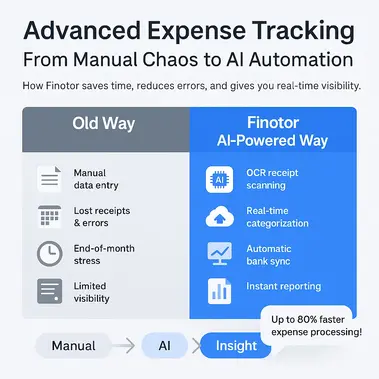
Expense trackings app with unlimited data storage
- Learn how Finotor — All-in-one AI-based Accounting Software simplifies expense management.
Why advanced expense tracking matters
Effective expense management goes beyond simple data collection. Modern businesses require real-time visibility into spending patterns, automated categorization, and seamless integration with broader financial operations. Unlimited data storage keeps historical financial information accessible for trend analysis, compliance, and strategic planning without storage limits or extra costs.
- Separate personal and business expenses effectively with Bookkeeping for Startups.
The ability to track both personal and business expenses separately while maintaining comprehensive reporting has become fundamental for owners and finance teams managing complex structures.
Core features that transform expense management
Automated receipt processing & data capture
Advanced OCR eliminates manual entry by extracting key information from receipts and invoices. This automation reduces processing time while minimizing human errors common with manual transcription.
Key capabilities include:
- Digital receipt scanning with instant data extraction
- Automatic vendor and amount recognition
- Multi-format document processing support
- Real-time expense categorization
- Learn more about optimizing cash flow with Top Mobile App for Cashflow Forecasting
Intelligent expense categorization
AI-powered categorization learns from spending patterns to automatically classify expenses according to your business structure, adapting to industry-specific requirements and custom categories for consistent reporting.
Real-time banking integration
Direct banking connections import transactions automatically, eliminating manual entry and ensuring complete expense capture. This provides real-time cash-flow visibility and surfaces discrepancies immediately.
| Criteria | Traditional Methods | Automated Solutions |
|---|---|---|
| Data accuracy | Manual entry errors | Automatic verification |
| Processing time | Hours per week | Minutes per month |
| Real-time visibility | End-of-month reports | Instant updates |
| Reconciliation effort | Complex manual process | Automated matching |
Comprehensive financial reporting
Built-in reporting generates detailed expense analyses, trend reports, and compliance documentation. Customizable reports provide insights into spend, budgets, and cost centers for informed decisions.
- Explore All Features, Prices & Plans for full reporting tools.
Unified with your business operations
Unlike standalone tools, comprehensive financial platforms integrate expense management with invoicing, financial reporting, and business banking. This unified approach removes data silos and delivers complete visibility from a single dashboard.
- Simplify invoicing with Invoice Smarter: Smile and Get Paid!
Automated workflows ensure expense data flows directly into accounting, tax preparation, and analysis—without extra transfers or manual reconciliation.
Advanced capabilities for modern teams
Multi-currency & international support
Track expenses across currencies with automatic FX and standards-compliant reporting—accurate regardless of transaction location or currency.
- Discover Finotor accounting software for small businesses in India for international support.
Team collaboration & approvals
Built-in approval workflows streamline authorization while maintaining control. Team members submit via mobile; managers get automated notifications.
- Multi-level approval hierarchies
- Automated notifications
- Policy enforcement rules
- Expense delegation
- Audit trail documentation
Compliance & audit readiness
Automated compliance and full audit trails reduce the complexity and cost of audits while supporting regulatory requirements.
Documentation & record keeping
Unlimited data retention preserves complete historical records for long-term compliance and analysis.
Mobile accessibility (with offline)
Mobile-first design enables capture and management anywhere. Offline functionality keeps work moving without connectivity, syncing automatically when back online. Cloud-based architecture with unlimited storage keeps data accessible across devices with robust security and backups.
| Mobile Feature | Benefit |
|---|---|
| Offline receipt capture | Continue working without internet |
| GPS location tracking | Automatic mileage and location logging |
| Camera integration | Instant receipt digitization |
| Cross-device synchronization | Access from any device |
- Learn more about mobile finance management with Top Mobile App for Cashflow Forecasting.
Security & data protection
Enterprise-level security protects sensitive financial information via encryption, secure authentication, and regular assessments—providing bank-level safeguards without sacrificing accessibility.
- End-to-end data encryption
- Multi-factor authentication
- Regular security assessments
- Compliance with financial regulations
- Automatic backup systems
Implementation & scalability
Professional setup & migration
Implementation support helps teams transition from manual processes or basic tools without disruption.
Adaptable business models
From sole proprietors to multi-entity organizations, the platform scales with transaction volumes, users, and features.
From expenses to a complete financial solution
Integrated platforms like Finotor combine expense tracking with invoicing, banking, and full financial management—delivering complete visibility while reducing the complexity of juggling multiple systems.
- Read about the Best Freelance Accounting Software
- Learn how The Best Self-Employed Accounting Software helps small businesses
- Explore Free nonprofit accounting software
AI-driven automation handles routine tasks, allowing owners and finance teams to focus on strategy rather than admin—consolidating tools and costs into one platform.
Frequently Asked Questions
What is advanced expense tracking?
Advanced expense tracking centralizes capture, categorization, and reconciliation using AI and automation. It replaces manual spreadsheets with OCR for receipts, real-time bank feeds, and audit-ready reporting for full visibility and control.
How does receipt OCR reduce manual work?
Optical character recognition (OCR) extracts vendor, date, taxes, and amounts from photos or PDFs, removing manual data entry and reducing errors while accelerating processing.
What are the benefits of real-time bank integration?
Direct bank connections import transactions automatically, improving accuracy, providing instant cash-flow visibility, and enabling automated matching for faster reconciliations.
How does AI categorization improve reporting?
AI learns from your chart of accounts and spending patterns to auto-classify expenses consistently across teams and entities, resulting in cleaner reports and better insights.
Can I separate personal and business expenses?
Yes. You can track personal and business expenses independently while maintaining consolidated dashboards and reports for compliance and decision-making.
Does it support multiple currencies and countries?
Multi-currency is supported with automatic exchange rates and standards-compliant reporting, helping international teams stay accurate across locations.
Is there mobile and offline functionality?
Yes. Capture receipts from mobile, approve expenses on the go, and work offline when needed; changes sync automatically when you’re back online.
How does it help with audits and compliance?
Automatic audit trails, policy rules, and complete document archives simplify reviews, reduce risk, and support regulatory compliance.
How is financial data secured?
Data is protected with end-to-end encryption, multi-factor authentication, regular security assessments, role-based access, and automated backups.
How do we migrate from spreadsheets?
A guided onboarding imports historical data, maps categories and vendors, connects bank feeds, and activates approval workflows with minimal disruption.