For a number of years now, in the light of our experience in supporting distance selling companies that use Stripe to sell products or services, we have seen the difficulties encountered by users, particularly with Xero and Quickbooks.
The proof is in the forums on Xero (See below), for example, about the problems encountered with Stripe, and this has been the case for almost 10 years. Nothing seems to have changed yet. It’s still complicated to use Xero or Quickbooks when you have sales where the payments are managed by Stripe and, above all, automatic accounting processing of all Stripe transactions (sales, refunds, Stripe fees, etc.).
Let’s not forget that Stripe is implemented on over 1.2 million websites. So imagine the number of transactions in total. That’s why we created Finotor. Finotor is an innovative AI-based solution for automating a company’s accounting and financial processing.
Stripe and Finotor: Revolutionize with automated accounting
While reading this article, you can listen to Sarah and Franck discuss all the benefits for Stripe users
Here’s how Finotor automatically generates an accounting entry from a Stripe Payout, based on AI and the native integration described in the official documentation:
How Stripe works with Finotor: Step-by-step example
1. Synchronising Stripe Payout
- Finotor retrieves the Payout via the Stripe API as soon as it is paid into your bank account (net amount: sales – refunds – fees).
2. Automatic analysis and breakdown
- Finotor’s AI breaks down the Payout in detail:
- individual sales by customer/product
- anyrefunds
- stripe fees applied to each transaction
3. Intelligent bank reconciliation
The bank transfer (the Payout) is automatically reconciled with the corresponding Stripe transactions, without any manual intervention or duplication, even if several sales are included in the same transfer.
4. Creation of the complete accounting entry
- Based on the breakdown :
- Debit: bank account (net amount received)
- Credit: sales account for each invoice
- Credit or charge: Stripe expenses account
- Credit or revenue correction: refunds where applicable
- The entry is balanced and ready to be validated in the general ledger.
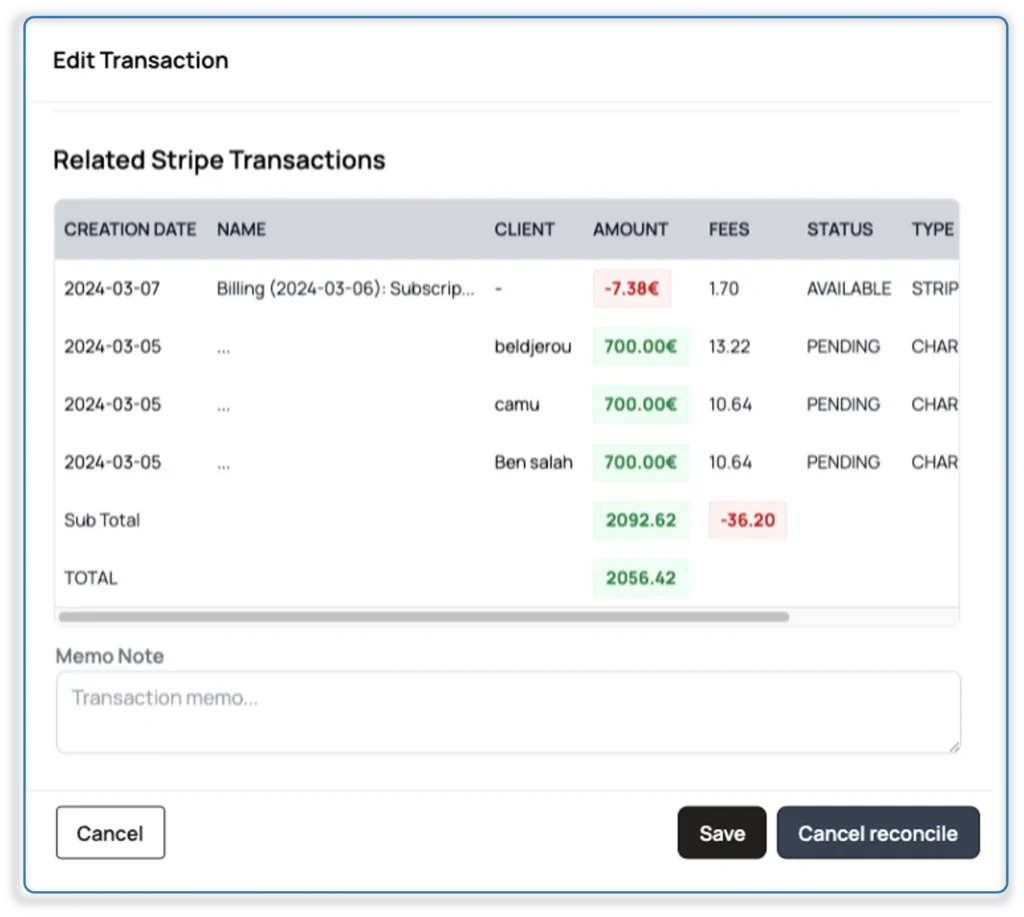
5. Simple verification
- You immediately see the entry generated, linked to Stripe transactions, with a clear link to each sale, refund and charge.
- A simple visual check is all you need: nothing to adjust manually.
📊 An illustrative case study
Suppose Stripe makes a Payout of $500, made up of:
- $550 in sales (three transactions)
- -30 in Stripe fees
- -20 in refunds
Finotor will automatically :
| Poste | Montant |
|---|---|
| Débit (banque) | 500 $ |
| Ventes crédit | 550 $ |
| Frais débit | -30 $ |
| Remboursements crédit | -20 $ |
The result is balanced, in accordance with the principle of double-entry bookkeeping, and reflects the full transactional details.
🧠 Why is it better than Xero or QuickBooks?
- Native Stripe integration: no third-party modules like A2X or Synder.
- Detailed breakdown of Payout with charges and refunds included.
- Complete automation: accounting entries reconciled by AI.
- No duplicates generated and no need to correct records.
- Total transparency: every sale, charge and refund can be traced in a single entry.
| 🔍 Feature | Xero (no add-on) | Xero + third-party module | Finotor |
|---|---|---|---|
| Automatic sales detection | ❌ | ✅ (e.g., via A2X) | ✅ Native via Stripe API |
| Stripe Payout details | ❌ | ✅ | ✅ Automated |
| Auto bank reconciliation | ❌ | ⚠️ (frequent errors) | ✅ 100% automated |
| Risk of duplicates | ⚠️ High | ⚠️ Medium | ❌ None (linked + consolidated) |
| Extra subscription needed | ❌ | ✅ $19–49/month | ❌ No extra fee |
| Built-in Stripe expertise | ❌ | ❌ | ✅ Native, built for Stripe |
| AI for transaction categorization | ⚠️ Basic | ❌ | ✅ Machine learning |
| Stripe-aware user support | ❌ | ❌ | ✅ Yes, with e-commerce expertise |
📚 Proof on Xero forums
Here are some links that confirm what many Stripe users have experienced:
https://central.xero.com/s/question/0D58V00009wFfNZSA0/stripe-reconciliation-issues
→ “I’m having a terrible time reconciling Stripe payments. It’s making my accounts a mess.”
https://central.xero.com/s/question/0D53m00006VFMqkCAH/stripe-reconciliation
→ “Find it time consuming on reconciliation on Stripe accounts.”
https://central.xero.com/s/question/0D53m00005qPQQSCA4/stripe-and-xero-reconciliation-problems
→ And in the replies: one user recommends Finotor as an alternative.
Our information is based on verified and verifiable information. This shows two things. These problems are known and long-standing. And Xero has not fixed the root of the problem. What’s more, Finotor has been identified as a serious alternative, especially by those who have an online payment activity.
✅ Why this demonstration confirms Finotor’s interest for you
💼 Everything is designed around Stripe, with no need for extensions like A2X.
📉 You avoid duplicates, errors and time-consuming manual tasks.
🔄 Navigation is intuitive and the AI does most of the work for you.
⏱ A simple, fast and efficient accounting workflow, perfectly suited to your ecommerce business.
✨ Bonus: Interface designed for non-accountants
- Clear interface (much more intuitive than Xero or QuickBooks).
- Real-time dashboards, accounting assistance AI, automatic suggestions.
✅ To sum up
- Finotor transforms a Stripe Payout into a complete accounting entry, in just one click.
- Thanks to the built-in AI, everything is automatically synchronised: sales, expenses, reimbursements and bank reconciliation.
- The process is transparent, secure and time-saving.
- You keep a clear record of every financial event linked to Stripe in your accounts, without any manual intervention.